Flash & set up
Once the box is assembled, three short stages get it running: flash CircuitPython, copy the app, then set up WiFi and pick your parks from a web page the sign hosts itself. After that it runs on its own, and new parks arrive without you doing anything.
Flash CircuitPython 9.2.8
The app runs on CircuitPython 9.2.8. Connect the board over USB-C and double-tap its RESET button to enter the bootloader. A drive named MATRIXS3BOOT (or similar) appears. Drag the CircuitPython .uf2 onto it; the board reboots and remounts as CIRCUITPY.
Download CircuitPython 9.2.8 (.uf2)
Copy the app
Download the app (one zip, built from the current release), unzip it, and copy the contents of the folder onto the CIRCUITPY drive. When the copy is done the drive should look exactly like this:
- boot_out.txt
- boot.py
- code.py
- lib
- README.txt
- safemode.py
- src
- themeparkwaits-3.5.x
When the copy finishes, eject the drive, unplug the board, wait five seconds, and plug it back in; the sign boots. Finish with the unplug, not the RESET button, which can leave the WiFi radio in a bad state.
Download the 3.0 app (zip) Browse the source on GitHub →
lib folder. The lib in the picture above holds the ScrollKit library, which lives in its own repo. The src/lib folder inside the app repo is a different thing (the Adafruit driver bundle) and stays where it is, inside src. A by-hand install is: code.py, boot.py, and src from the app repo, plus the ScrollKit repo’s src/scrollkit folder copied onto the drive as lib/scrollkit (skip its simulator and dev folders; the board never uses them). The zip already has all of this laid out, which is why it’s the easy path.
Want to change something first? Make It Yours shows how to tweak the code or add your own ride animation, then copy your version instead.
Connect WiFi from your phone
On first boot with no saved network, the sign scrolls join instructions and opens its own WiFi access point. Connect your phone to it, and a setup page appears at http://192.168.4.1. Pick your home network, enter the password, and the sign saves it and reconnects on its own. No cables, no editing files.
Pick your parks & style
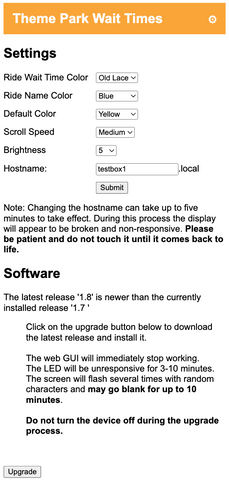
Once it’s online, the sign advertises itself on your network as http://themeparkwaits.local. Open that in any browser to choose up to four parks, set brightness and colors, pick a scroll speed and number-reveal effect, sort or group rides, and hide closed rides or character meets. Save, and the display rebuilds with your picks.
How updates work
Two things change over time, and they update differently. Parks and wait times come from a server that already tracks them, so the sign fetches a small file every ten minutes and new parks appear on their own. Nothing to install, nothing to click.
The app itself, meaning new features and ride art, ships as a zip you copy to the board over USB, the same way you installed it just now. It takes about ten minutes and you do it when you feel like it. There is no subscription and no account: the zip is just the latest release of the public GitHub project, and if you are running your own customized copy you can ignore it and pull changes yourself.
The sign used to update itself over the internet. That feature is gone, and the reason is worth stating plainly: downloading over an encrypted connection eventually leaves the board unable to open a new connection to anything until it reboots. It is a bug in CircuitPython, below our code, and we cannot fix it from here. Avoiding encrypted downloads entirely is what makes the sign stable, so that is what it does now, and USB is how every update arrives.
Update your sign is the walkthrough for that USB session: every step, every button, and what to do when the drive shows up read-only. Worth a bookmark, because it is the page you will use for every release from here.
Coming from 2.x
Already have an older Theme Park Waits box, bought or built? It already runs the CircuitPython 3.x wants, so there’s no flashing to do. The 2.x app can’t fetch 3.x by itself, so the jump is the same USB session as any other update, plus reconnecting WiFi and re-picking your parks at the end. About ten minutes, once. Every update after that keeps your settings.